

Making and receiving calls directly in Odoo is the starting point of a useful telephony integration. Employees also need to recognise the caller, find the right record, see previous conversations and notice a missed call before it disappears into a separate phone application.
The ERPixel Odoo–FreeSWITCH Connector is an existing, installable module for Odoo 18 and 19, Community and Enterprise. It connects incoming and outgoing calls, internal employee extensions, caller identification, call history and recordings with the Odoo environment. Companies can configure the connection to fit their own business processes.
The core connector already exists. Customer-specific work is primarily about configuring how calls should interact with the company's Odoo processes.
— ERPixel expert interview
This guide explains how the integration works, where FreeSWITCH responsibilities end, and how calls become useful business records. It draws on the ERPixel expert interview and the confirmed product functionality, with practical examples clearly separated from customer case studies.
The Language Behind Modern Business Calling
Before discussing architecture, it helps to understand the terms behind business telephony in business language. These concepts are often technical, but their value is very practical.
- FreeSWITCH: An open-source communication platform used to build voice, video, and messaging systems. Example: a company uses FreeSWITCH as the core engine for its internal and external VoIP calls.
- PBX: A private business phone system that manages extensions, call transfers, voicemail, queues, and routing. Example: a distributor routes calls from the main number to sales, warehouse, accounting, or technical support.
- SIP: A protocol that allows VoIP devices and platforms to start, manage, and end calls. Example: desk phones, softphones, and FreeSWITCH communicate through SIP.
- Call routing: Rules that decide where incoming calls should go. Example: VIP customers are routed directly to senior account managers, while new leads go to the sales queue.
- CTI integration: The connection between telephony and business software such as Odoo CRM. Example: when a customer calls, the connector identifies a known caller and lets the employee open the linked Odoo record.
- CDR: Call Detail Records that store call time, duration, number, status, direction, and other call data. Example: call records provide the inputs for reviewing communication; the exact dashboard depends on the reporting scope.
- Call queue: A group of operators who receive incoming calls according to defined rules. Example: support calls are distributed between available agents, while the system tracks waiting time and missed calls.
- Operator performance tracking: Monitoring how employees handle calls. Example: a company defines which call records and follow-up actions it needs to review for each team.
For technical configuration terminology, see the official FreeSWITCH documentation. The module connects this telephony layer with Odoo; it does not replace the phone infrastructure.
Why Voice Data Becomes a Management Problem
The challenge is not that businesses cannot make phone calls. The real issue is that phone activity often lives outside the operational system. Without proper FreeSWITCH and CRM integration, calls become invisible work.
Managers cannot measure response time. Sales teams forget follow-ups. Support agents repeat questions customers already answered. Operators may handle dozens of calls every day, but management cannot see what actually happened: who called, who answered, what was discussed, whether the call was linked to a lead or ticket, and whether the next action was planned.
This creates a dangerous gap between communication and operations. CRM shows one version of reality. The phone system shows another. Employees know something informally, but the business does not have structured data.
For growing companies, this becomes a serious management problem. It affects sales conversion, service quality, employee accountability, and customer trust.
What FreeSWITCH Handles—and What the Connector Adds
FreeSWITCH is the telephony layer. It handles provider connections, extensions, routing, IVR and the recording of conversations. The ERPixel connector brings incoming and outgoing call interaction, call records, caller identification and access to those recordings into Odoo.
The telecom or SIP provider is configured on the FreeSWITCH side. Provider compatibility belongs to that infrastructure; it is not a promise that the Odoo connector works with every provider. ERPixel can recommend providers. The connector is not tied to a specific FreeSWITCH version; ERPixel recommends the latest version for a new deployment.
Two ways for employees to make and receive calls
Inside Odoo: with VoIP configured, employees can accept an incoming call through the browser while Odoo is open. The interface identifies the number and can show the caller’s name, photo and related business information when available. Click-to-dial lets employees call a saved number without retyping it into a phone.
With an external phone or softphone: employees can use an external VoIP application or phone. This suits staff who mainly handle calls and do not otherwise need to work in Odoo. A company can use both working models for different employees.
This removes the need for an additional softphone application for employees who already work in Odoo.
— ERPixel expert interview
Incoming and outgoing calls are available from any Odoo module. Calling from Accounting, CRM, Sales or Helpdesk does not itself change how that module works. Creating a related document is a separate, configurable behaviour.
Identify the Caller and Open the Right Odoo Record
Each incoming call creates a call record. If the number belongs to an existing contact, the connector can associate the call with that contact. Unknown callers can be distinguished from existing customers. Contact creation can also be enabled, including filling the phone number and determining the country from its prefix.
The incoming-call popup helps an employee identify the person and company and access associated leads. From the popup, the employee can open the call form, contact, lead or another record linked to the call. Matching the number with Odoo data is what makes a conversation easier to continue without asking the caller to repeat everything.
Document creation follows the user’s settings
The type of record created for an incoming call follows the individual user’s preferences, group and configured module connection:
- CRM: a Lead or Opportunity.
- Sales: a sale record.
- Helpdesk: a ticket.
- Accounting: a Vendor Bill record.
These are alternatives selected for the workflow, not four documents created by every call. FreeSWITCH IVR can route an incoming call and supply routing context, while the user’s configuration determines the Odoo behaviour. It should not be described as a fixed rule that everyone in one department must use the same record type.
Automation can be configured per PBX extension for incoming or outgoing calls. For example, a company can enable lead generation for outgoing calls. This lets the company choose when a call should create business work and when a call record alone is sufficient.
Make Missed Calls Visible and Keep Follow-up Organised
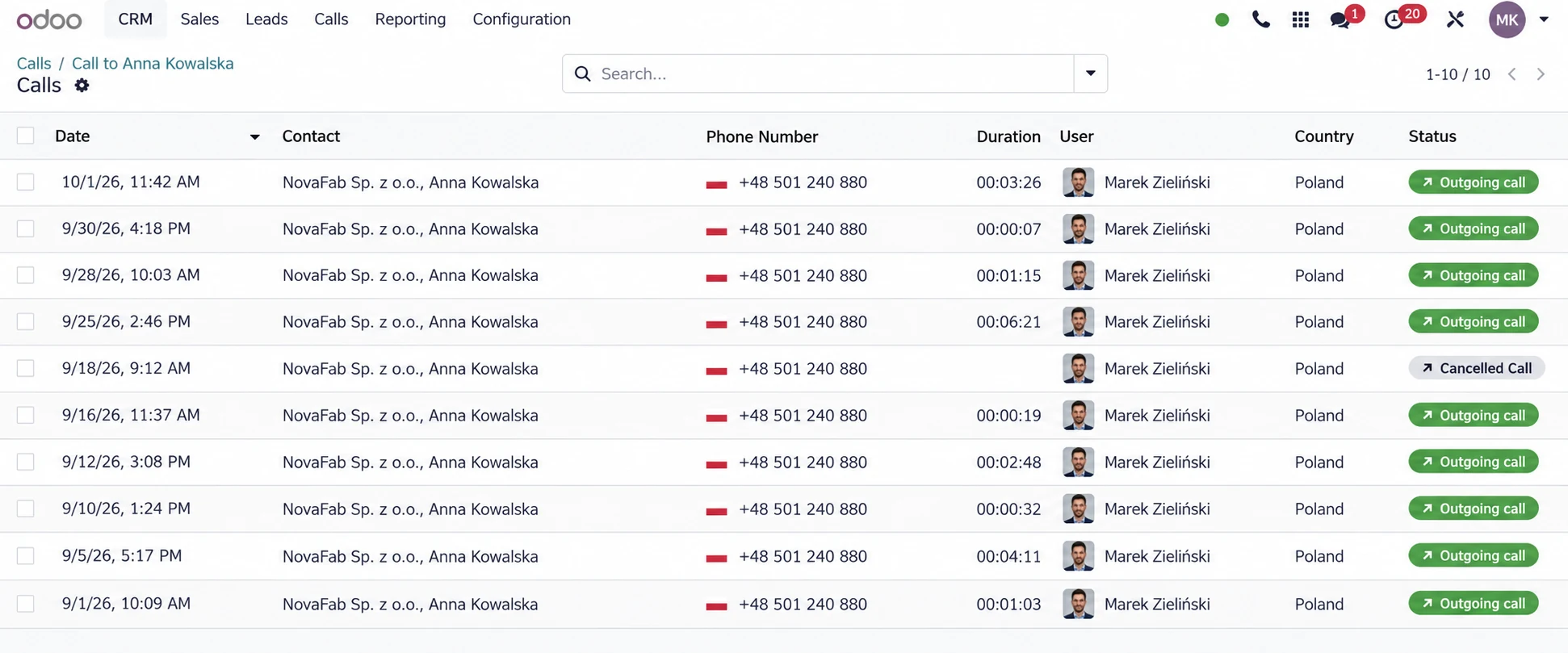
Missed calls are registered, visibly distinguished in the call list and available through a dedicated widget. Important callbacks can be highlighted for priority attention. The expert described these urgent follow-ups as “burn calls”: conversations that should receive rapid attention under the company’s communication policy.
The connector's responsibility is to capture the event and make the missed call operationally visible inside Odoo.
— ERPixel expert interview
A missed-call widget gives employees a practical starting point for follow-up. How a business distributes callbacks between colleagues remains its own working process. It is a configuration and management choice, not a missing connector feature. Do not confuse visible missed calls with an automatic promise that every missed call creates a CRM activity or is assigned to a particular manager.
Call forwarding and internal employee numbers belong alongside incoming and outgoing calling. Employees can reach colleagues through short extensions configured in FreeSWITCH, including colleagues in different physical locations. This supports internal communication as well as calls with customers.
Call History and Recordings in the Odoo Thread
Calls can appear chronologically in the discussion thread of contacts, leads, opportunities, sale orders, tasks, employees and other models with a discussion thread. Employees can add descriptions and open the conversation in its business context. Calls can be linked automatically and manually rebound to another record when the original association needs to change.
This addresses a familiar operational problem: one person remembers the phone conversation while another sees only emails and notes. Keeping the call alongside the relevant record makes the history easier to follow. The call list provides another familiar view, including descriptions, contact images and an audio player where a recording is available.
The actual audio files are stored on the FreeSWITCH side.
— ERPixel expert interview
FreeSWITCH records and stores the conversation; the connector makes it accessible from Odoo. Recording must be enabled in the telephony configuration, and the customer needs enough FreeSWITCH server storage for the required audio volume. Odoo is the convenient place to listen in context, not necessarily the primary audio store.
AI Transcription and Conversation Analysis as an Extension
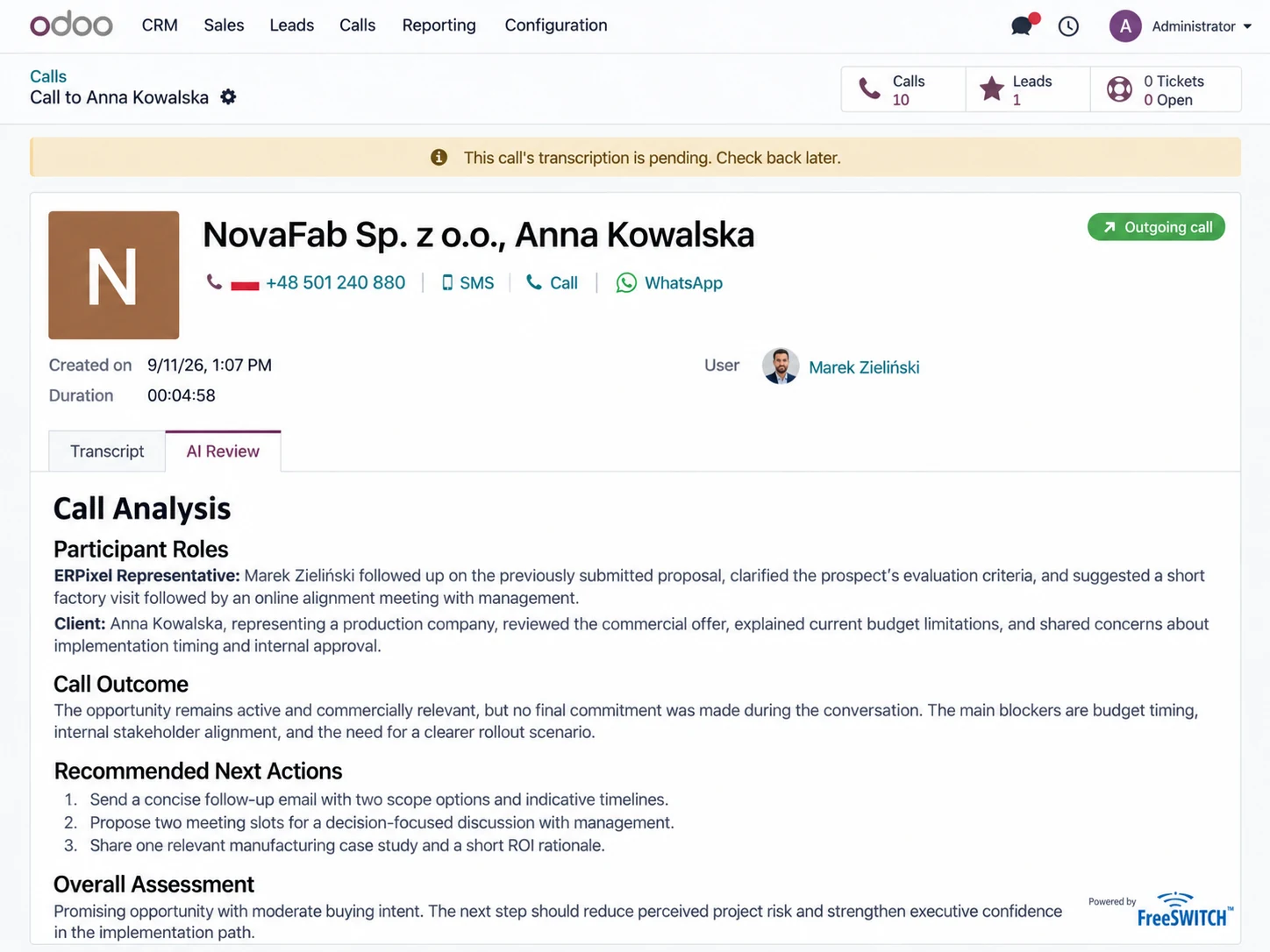
ERPixel offers AI speech transcription and conversation analysis as an advanced extension. It can help a company understand what conversations were about, the type of communication, what a customer wanted to purchase and what an employee was offering.
The core connector does not depend on AI in order to perform its primary functions.
— ERPixel expert interview
Incoming and outgoing calls, internal extensions, identification, call registration, missed-call visibility and access to recordings are part of the core solution. Transcription and conversation analysis add a separate layer for teams that need deeper communication review. A company can adopt telephony integration without adopting AI at the same time.
Define how the analysis will be used: for example, finding the topic of a customer conversation or reviewing communication across a team. Human review remains useful when interpreting an analysis in the context of the actual customer relationship. The extension should not be described as automatic quotation creation, lead-stage changes or a guaranteed next-action engine.
Example 1: A B2B Equipment Supplier
Illustrative workflow, not a reported client result.
An industrial equipment supplier receives technical calls from dealers across several regions. Engineers answer questions, salespeople quote spare parts, and accounting discusses payment delays. However, all conversations happen through separate softphones. Odoo contains the customer records, but not the call context.
The consequences appear quickly. A dealer calls about a delayed part, but the sales representative does not know that support already promised a replacement. An engineer gives technical advice, but no ticket is created. A salesperson receives an important inquiry, but forgets to log the call in CRM. A missed call from a key dealer remains unnoticed.
The company loses credibility because departments work from different versions of reality. Ignoring the problem turns every phone call into a potential operational risk.
With Odoo and FreeSWITCH integration, the same process can work differently. Incoming calls are identified by phone number. The responsible manager can see the customer record before answering. Calls are logged automatically. Missed calls are visible in the call list and widget for follow-up. Important conversations can be linked to CRM opportunities, Helpdesk tickets, or service tasks. The team can review calls in their associated records instead of relying only on memory.
Example 2: A SaaS Company With Growing Support Demand
Illustrative workflow, not a reported client result.
A SaaS provider starts with a small support team and a separate VoIP setup. As customer calls increase, agents need to recognise the caller and find the relevant support history. Manual notes alone make it difficult to continue a conversation when a different colleague answers.
With the connector, the number can be matched to an existing contact and the call connected to a Helpdesk workflow. A user configured for Helpdesk can create a ticket for the incoming call. Notes and access to a FreeSWITCH recording can remain with the communication history rather than in an unrelated phone application.
A missed call remains visible for the team’s callback process. If the issue needs escalation, employees can use their established Helpdesk responsibilities and follow-up process. The connector supplies the communication record; the company decides how its support operation should respond.
Automate Call Logging and Reduce Manual Work
Manual call logging is one of the weakest points in CRM usage. Employees forget to register calls, write incomplete notes, or log information too late. As a result, CRM becomes unreliable.
FreeSWITCH and Odoo integration can solve this problem by automatically creating call records in Odoo. The system can register incoming, outgoing, missed, and answered calls. The call list and linked records bring the conversation into the normal Odoo workflow, with descriptions and access to available recordings.
For managers, this means better visibility. For employees, it means less routine work. For the company, it means more reliable data.
This is especially important when a business has many operators, several departments, or a high volume of customer communication. The more calls the company handles, the more dangerous it becomes to rely on manual notes only.
Use Call Records to Improve Business Decisions
One useful outcome of Odoo VoIP integration is the ability to review communication where the business already works. Managers can ask which calls were missed, which records conversations belong to and whether the team’s callback process is being followed.
Start with the records and views available in the deployed configuration. Broader indicators—queue waiting time, operator workload, call-to-opportunity conversion or support response quality—need a defined reporting scope and suitable data. They should not be confused with a ready-made dashboard included automatically in the connector.
For example, counting missed calls tells a manager where attention is needed. Understanding why a call did not become an opportunity requires the CRM context and a consistent sales process. Call duration alone cannot establish whether a customer received a useful answer.
These questions can guide business intelligence and reporting work where a company needs it. Begin with a small set of decisions that the team can actually act on rather than collecting metrics without a clear owner.
Configure the Integration Around the Company’s Working Day
The first discussion should cover how employees make and receive calls today and which parts of that work belong in Odoo. A new installation starts with the existing connector; the business-specific work is configuring the call behaviour and its links to the company’s processes.
- Confirm the Odoo environment. The supported scope is Community and Enterprise editions of Odoo 18 and 19.
- Identify the telephony layer. Review FreeSWITCH, the chosen provider, extensions, routing and IVR. Provider configuration stays on the FreeSWITCH side.
- Choose employee interfaces. Decide who uses browser calling in Odoo and who uses an external phone or softphone.
- Configure record creation. Set the user preferences and extension rules for contact matching, linked records and incoming or outgoing document creation.
- Agree the callback process. Use missed-call visibility and prioritisation with clear team responsibilities.
- Decide about recordings and AI. Enable recording where required, plan FreeSWITCH storage and select advanced transcription or analysis if useful.
These decisions can be coordinated with Odoo integration services or a wider Odoo implementation. They do not imply that the connector has to be developed from scratch for every customer.
Plan Security, Scalability, and Maintenance Early
FreeSWITCH is powerful, but power requires governance. Businesses should think about secure SIP configuration, access control, call recording policies, failover, backups, and monitoring. They should also define who owns the system: IT, operations, sales management, or an external partner.
Call recordings, customer data, and operator activity are sensitive areas. The company should define who can access call history, which calls may be recorded, how long data should be stored, and how this fits internal policies and legal requirements.
A reliable implementation connects telephony architecture with Odoo customization, user permissions, CRM logic, Helpdesk processes, and reporting needs.
ERPixel can support Odoo development and implementation for companies that want FreeSWITCH-based communication to fit their ERP and CRM processes, not remain a separate technical island.
Explore the ERPixel Odoo–FreeSWITCH Connector
The practical value starts with making and receiving calls from Odoo, identifying the caller and keeping communication visible. Call history, missed-call widgets, internal numbers and access to recordings help employees continue work in the same environment as their business records.
For screenshots and a detailed view of the available features, explore the ERPixel Odoo–FreeSWITCH Connector product page. It shows the calling interface, call history and optional AI analysis alongside the product description.
The next step is to connect these capabilities to the way your employees work: who answers, what record they need, which follow-up matters and where the conversation should remain accessible.